GPT 的代码能力真不行
事情是这样的,我想常用“▸”这个特殊符号,但正常的输入法打出来太麻烦了
于是我灵机一动,让 GPT 写个油猴脚本设置快捷键输入
结果它改了好几次都不行,换成 Gemini 一次就成功了😅
真就 AI 比 AI,气死人
最后让 Gemini 写了一个完全版,可以自定义快捷键,还能插入 emoji 😄
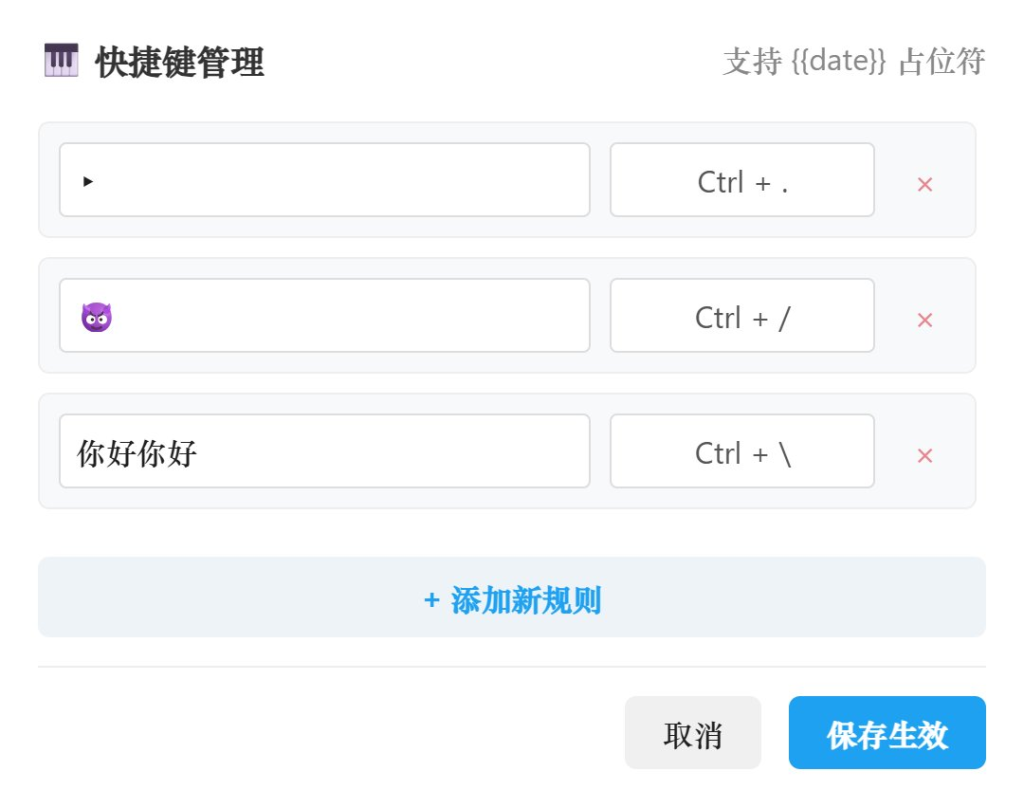
不过 AutoHotkey 这些功能都有,算是重复造轮子了
代码如下:
    // ==UserScript==
// @name         多功能快捷插入助手 (Ultimate)
// @namespace    http://tampermonkey.net/
// @version      5.0
// @description  支持无限添加自定义快捷键与符号 (React/ 推特 /Notion 全兼容)
// @match        *://*/*
// @grant        GM_setValue
// @grant        GM_getValue
// @grant        GM_registerMenuCommand
// @run-at       document-end
// ==/UserScript==

(function() {
    'use strict';

    // === 1. 初始化配置 (自动迁移旧数据) ===
    const defaultRules = [
        {
            id: 'default_1',
            symbol: "▸",
            shortcut: {key: ".", ctrl: true, alt: false, shift: false, meta: false}
        }
    ];

    // 获取数据,如果格式是旧版的对象,强转为数组
    let rules = GM_getValue("userRules", defaultRules);
    if (!Array.isArray(rules)) {
        // 尝试迁移 v4.0 的旧数据
        const oldConfig = GM_getValue("userConfig");
        if (oldConfig) {
            rules = [{id: 'migrated_' + Date.now(),
                symbol: oldConfig.symbol || "▸",
                shortcut: oldConfig.shortcut || defaultRules[0].shortcut
            }];
        } else {rules = defaultRules;}
        GM_setValue("userRules", rules);
    }

    // 注册菜单
    GM_registerMenuCommand("⚙️ 管理快捷键规则 ", showSettingsModal);

    // === 2. 核心监听逻辑 ===
    document.addEventListener('keydown', function(e) {
        // 如果在设置面板内,不触发插入
        if (document.getElementById('tm-ultimate-settings-modal')) return;

        // 忽略纯修饰键
        if (['Control', 'Alt', 'Shift', 'Meta'].includes(e.key)) return;

        // 遍历所有规则,寻找匹配项
        const matchedRule = rules.find(rule => {
            const s = rule.shortcut;
            return (e.key.toLowerCase() === s.key.toLowerCase()) &&
                   (e.ctrlKey === s.ctrl) &&
                   (e.altKey === s.alt) &&
                   (e.shiftKey === s.shift) &&
                   (e.metaKey === s.meta);
        });

        if (matchedRule) {
            const el = document.activeElement;
            if (!el) return;

            // Shadow DOM 穿透
            let target = el;
            if (el.shadowRoot && el.shadowRoot.activeElement) {target = el.shadowRoot.activeElement;}

            const isInput = target.tagName === 'INPUT' || target.tagName === 'TEXTAREA';
            const isContentEditable = target.isContentEditable;

            if (isInput || isContentEditable) {e.preventDefault();
                e.stopPropagation();

                // 处理动态占位符(比如当前日期)const textToInsert = processDynamicText(matchedRule.symbol);
                insertText(target, textToInsert);
            }
        }
    }, true);

    // 处理动态文本 (可选功能)
    function processDynamicText(text) {const now = new Date();
        return text
            .replace('{{date}}', now.toLocaleDateString())
            .replace('{{time}}', now.toLocaleTimeString());
    }

    // 插入逻辑 (保持 React 兼容性)
    function insertText(el, text) {
        let success = false;
        try {success = document.execCommand('insertText', false, text);
        } catch (err) {}

        if (!success && (el.tagName === 'INPUT' || el.tagName === 'TEXTAREA')) {insertToReactInput(el, text);
        }
    }

    function insertToReactInput(input, text) {
        const start = input.selectionStart;
        const end = input.selectionEnd;
        const originalValue = input.value;
        const newValue = originalValue.substring(0, start) + text + originalValue.substring(end);
        const nativeSetter = Object.getOwnPropertyDescriptor(window[`HTML${input.tagName === 'TEXTAREA' ? 'TextArea' : 'Input'}Element`].prototype, "value").set;
        nativeSetter && nativeSetter.call(input, newValue);
        input.dispatchEvent(new Event('input', { bubbles: true}));
        const newPos = start + text.length;
        input.setSelectionRange(newPos, newPos);
    }

    // === 3. 增强版设置 UI ===
    function showSettingsModal() {if (document.getElementById('tm-ultimate-settings-modal')) return;

        // 样式注入
        const style = document.createElement('style');
        style.innerHTML = `
            #tm-ultimate-settings-modal * {box-sizing: border-box; font-family: -apple-system, BlinkMacSystemFont, "Segoe UI", Roboto, sans-serif;}
            .tm-row {display: flex; align-items: center; gap: 10px; margin-bottom: 10px; padding: 10px; background: #f8f9fa; border-radius: 6px; border: 1px solid #eee;}
            .tm-input {flex: 1; padding: 8px; border: 1px solid #ddd; border-radius: 4px;}
            .tm-shortcut-btn {flex: 0 0 140px; padding: 8px; border: 1px solid #ddd; border-radius: 4px; background: #fff; cursor: pointer; text-align: center; font-size: 13px; color: #555;}
            .tm-shortcut-btn.recording {border-color: #1da1f2; color: #1da1f2; background: #e8f5fe;}
            .tm-del-btn {color: #dc3545; cursor: pointer; padding: 5px 10px; font-size: 18px; line-height: 1; opacity: 0.6;}
            .tm-del-btn:hover {opacity: 1;}
            .tm-add-btn {width: 100%; padding: 10px; background: #eef3f8; color: #1da1f2; border: 2px dashed #bwd; border-radius: 6px; cursor: pointer; font-weight: bold; margin-bottom: 15px; text-align: center;}
            .tm-add-btn:hover {background: #e1eef9;}
        `;
        document.head.appendChild(style);

        const modal = document.createElement('div');
        modal.id = 'tm-ultimate-settings-modal';
        modal.innerHTML = `
            <div style="position:fixed;top:0;left:0;width:100%;height:100%;background:rgba(0,0,0,0.4);z-index:999999;display:flex;justify-content:center;align-items:center;">
                <div style="background:white;padding:25px;border-radius:12px;width:550px;max-height:80vh;display:flex;flex-direction:column;box-shadow:0 10px 30px rgba(0,0,0,0.2);">
                    <h3 style="margin:0 0 20px 0;font-size:18px;color:#333;display:flex;justify-content:space-between;">
                        <span>🎹 快捷键管理 </span>
                        <span style="font-size:12px;color:#888;font-weight:normal;line-height:24px;"> 支持 {{date}} 占位符 </span>
                    </h3>

                    <div id="tm-rules-list" style="overflow-y:auto;flex:1;padding-right:5px;margin-bottom:15px;">
                        </div>

                    <div id="tm-add-btn" class="tm-add-btn">+ 添加新规则 </div>

                    <div style="text-align:right;border-top:1px solid #eee;padding-top:15px;">
                        <button id="tm-cancel-btn" style="padding:8px 20px;margin-right:10px;border:none;background:#f0f0f0;cursor:pointer;border-radius:6px;"> 取消 </button>
                        <button id="tm-save-btn" style="padding:8px 20px;border:none;background:#1da1f2;color:white;cursor:pointer;border-radius:6px;font-weight:bold;"> 保存生效 </button>
                    </div>
                </div>
            </div>
        `;
        document.body.appendChild(modal);

        // 临时数据副本
        let tempRules = JSON.parse(JSON.stringify(rules));
        const listContainer = modal.querySelector('#tm-rules-list');

        // 渲染列表函数
        function render() {
            listContainer.innerHTML = '';
            tempRules.forEach((rule, index) => {const row = document.createElement('div');
                row.className = 'tm-row';
                row.innerHTML = `
                    <input type="text" class="tm-input symbol-input" placeholder=" 输入要插入的文字 " value="${rule.symbol}">
                    <div class="tm-shortcut-btn" tabindex="0">${formatShortcut(rule.shortcut)}</div>
                    <div class="tm-del-btn" title=" 删除 ">×</div>
                `;

                // 绑定事件
                // 1. 修改符号
                row.querySelector('.symbol-input').oninput = (e) => {rule.symbol = e.target.value;};

                // 2. 录制快捷键
                const shortcutBtn = row.querySelector('.tm-shortcut-btn');
                shortcutBtn.onclick = () => {
                    // 重置其他正在录制的按钮
                    document.querySelectorAll('.tm-shortcut-btn').forEach(b => {b.classList.remove('recording');
                        if(b !== shortcutBtn) b.innerText = formatShortcut(tempRules[findRuleIndexByBtn(b)].shortcut);
                    });

                    shortcutBtn.classList.add('recording');
                    shortcutBtn.innerText = " 请按下按键...";
                };

                shortcutBtn.onkeydown = (e) => {if (!shortcutBtn.classList.contains('recording')) return;
                    e.preventDefault();
                    e.stopPropagation();
                    if (['Control', 'Alt', 'Shift', 'Meta'].includes(e.key)) return;

                    rule.shortcut = {
                        key: e.key,
                        ctrl: e.ctrlKey,
                        alt: e.altKey,
                        shift: e.shiftKey,
                        meta: e.metaKey
                    };
                    shortcutBtn.classList.remove('recording');
                    shortcutBtn.innerText = formatShortcut(rule.shortcut);
                    shortcutBtn.blur();};

                // 3. 删除
                row.querySelector('.tm-del-btn').onclick = () => {tempRules.splice(index, 1);
                    render();};

                listContainer.appendChild(row);
            });
        }

        // 辅助:找对应的 Rule Index
        function findRuleIndexByBtn(btn) {const rows = Array.from(listContainer.children);
            return rows.indexOf(btn.parentElement);
        }

        render();

        // 按钮事件
        modal.querySelector('#tm-add-btn').onclick = () => {
            tempRules.push({id: Date.now().toString(),
                symbol: "",
                shortcut: {key: "", ctrl: false, alt: false, shift: false, meta: false} // 空规则
            });
            render();
            // 自动滚动到底部
            setTimeout(() => listContainer.scrollTop = listContainer.scrollHeight, 50);
        };

        modal.querySelector('#tm-cancel-btn').onclick = () => {document.body.removeChild(modal);
            document.head.removeChild(style);
        };

        modal.querySelector('#tm-save-btn').onclick = () => {
            // 简单验证:过滤掉没有快捷键的规则
            rules = tempRules.filter(r => r.shortcut.key);
            GM_setValue("userRules", rules);
            document.body.removeChild(modal);
            document.head.removeChild(style);
            // 提示
            const msg = document.createElement('div');
            msg.innerHTML = ` 已保存 ${rules.length} 条规则 `;
            msg.style.cssText = "position:fixed;bottom:20px;right:20px;background:#333;color:#fff;padding:10px 20px;border-radius:4px;z-index:999999;animation:fadeout 2s forwards;";
            document.body.appendChild(msg);
            setTimeout(() => msg.remove(), 2000);
        };
    }

    function formatShortcut(s) {if (!s || !s.key) return " 点击录制快捷键 ";
        const parts = [];
        if (s.ctrl) parts.push("Ctrl");
        if (s.meta) parts.push("Cmd");
        if (s.alt) parts.push("Alt");
        if (s.shift) parts.push("Shift");
        let k = s.key;
        if (k === ' ') k = 'Space';
        parts.push(k.toUpperCase());
        return parts.join(" + ");
    }

})();
🤝 创作不易,感谢支持
您的支持是我持续输出的动力
加密资产波动大 • 能力要求高 • 请自行判断
正文完


